Solana RPC
Access the full Solana RPC API with enhanced performance, reliability, and global availability.
Mainnet Endpoint:
https://solana-mainnet.api.syndica.io/api-key/YOUR_API_KEY
Devnet Endpoint:
https://solana-devnet.api.syndica.io/api-key/YOUR_API_KEY



What is Solana RPC?
Solana RPC (Remote Procedure Call) facilitates communication between applications and the Solana blockchain. RPC nodes enable clients like DApps and wallets to send commands to Solana nodes over the network.
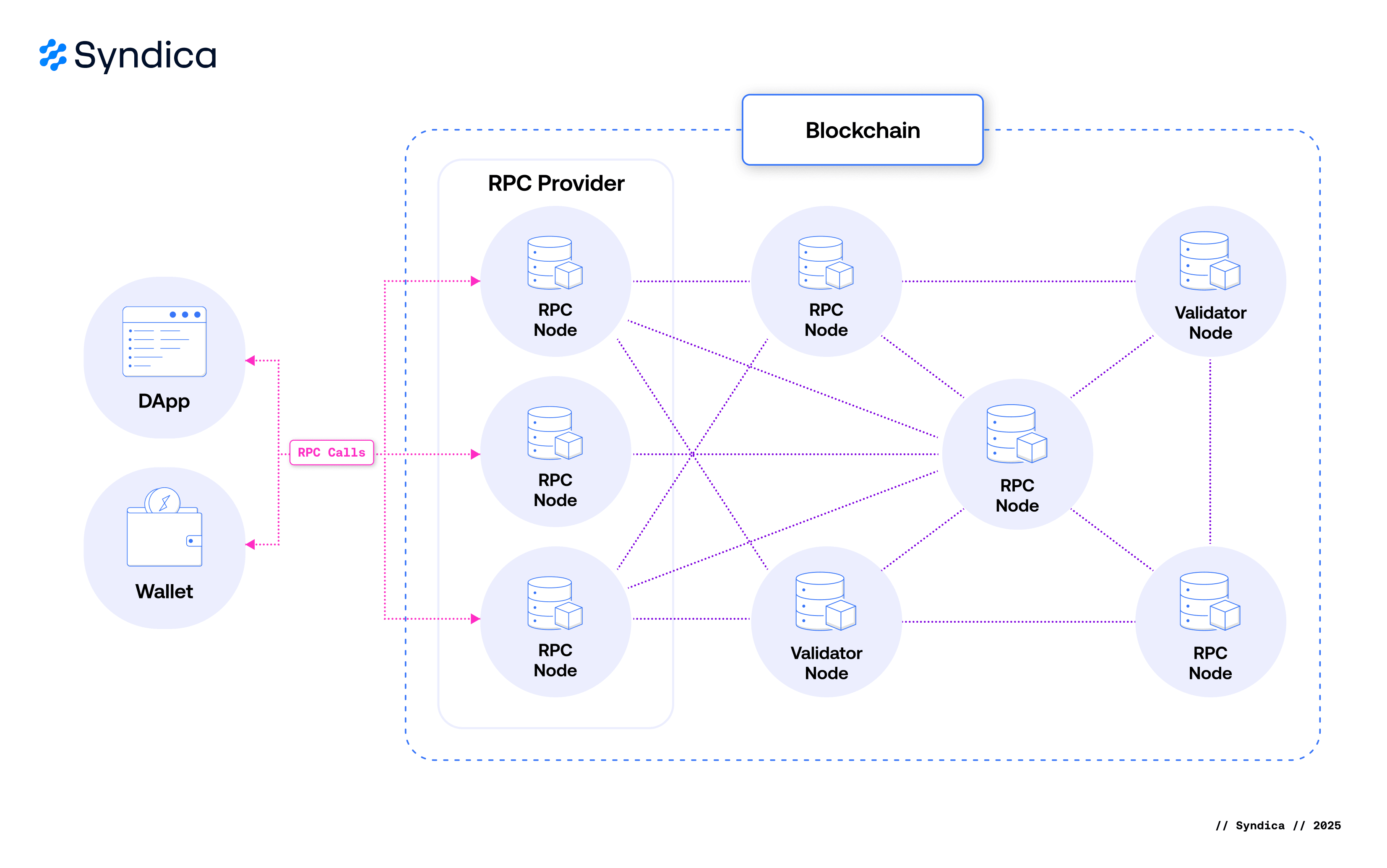
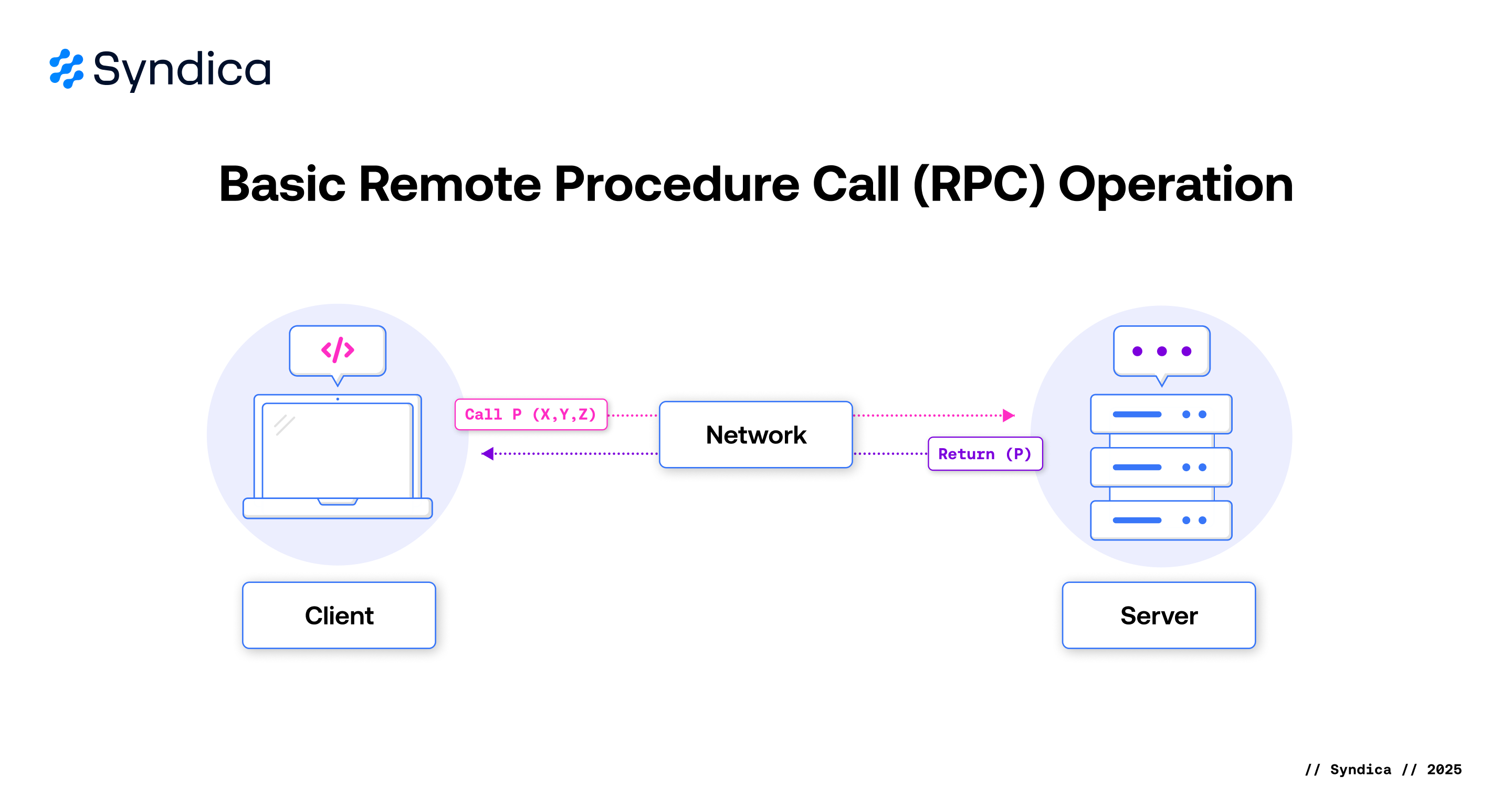
The API is built on the JSON-RPC 2.0 protocol standard, providing a standardized way to query blockchain state, submit transactions, and monitor network activity.
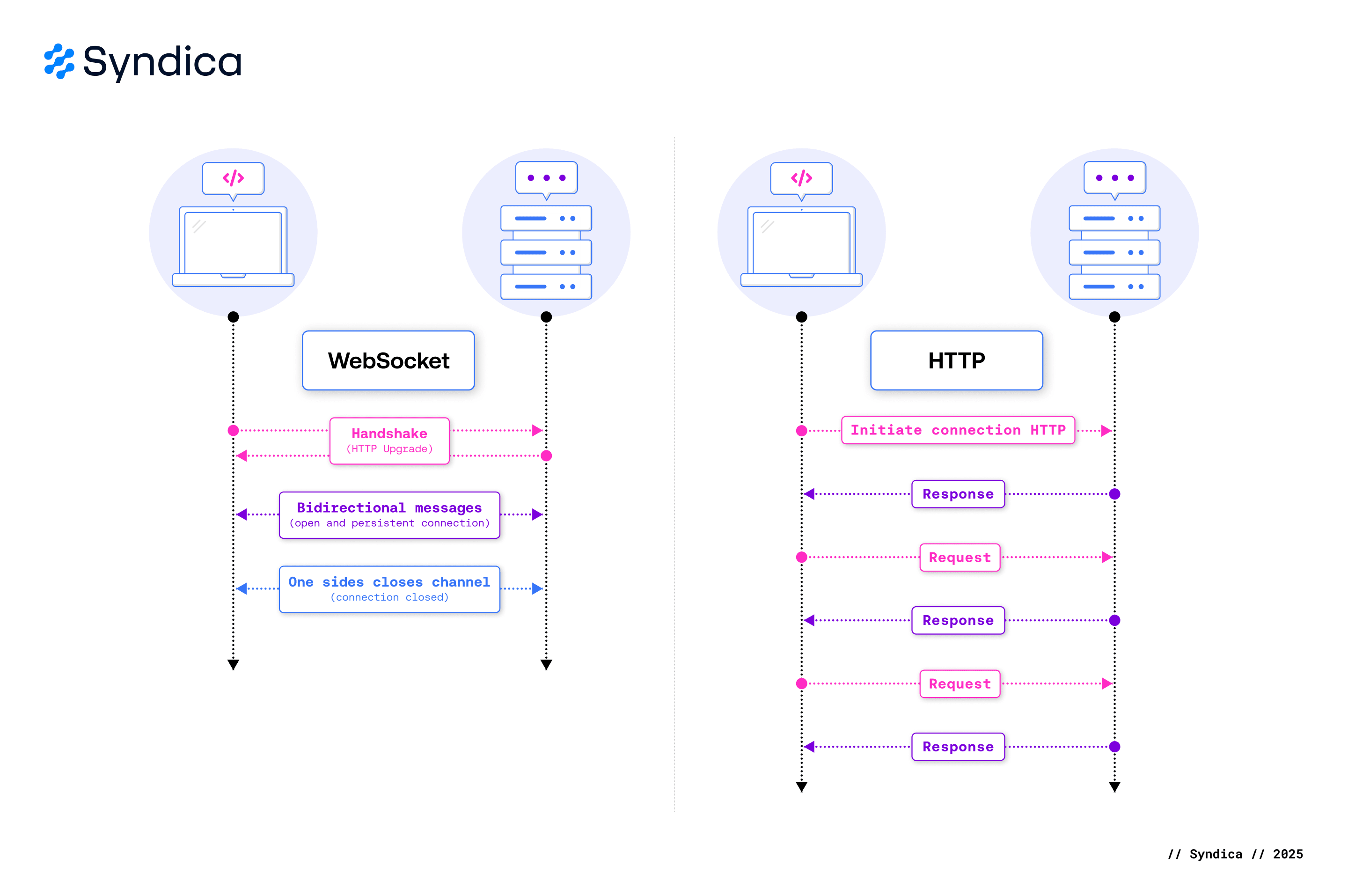
The API offers two interaction patterns: HTTP methods for querying data like account balances and transaction history, and WebSocket methods for real-time subscriptions that deliver updates as blockchain events occur.
Quick Start
Get started with Solana RPC by following these step-by-step guides. Each guide includes complete code examples and explains key concepts to help you integrate RPC calls into your application.
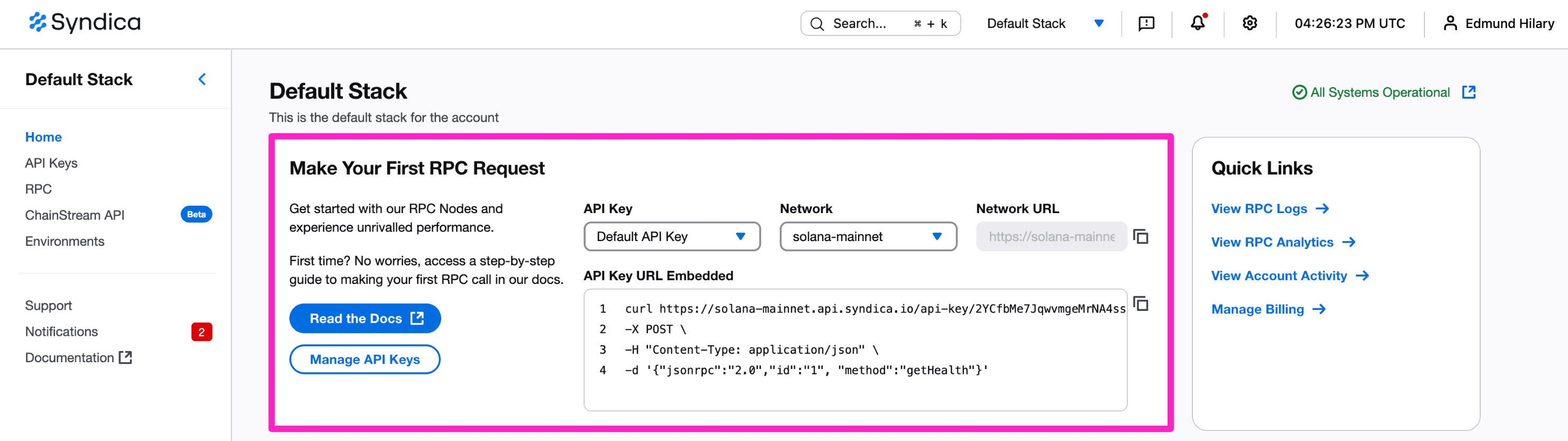
Quick Start Guides:
- Make Your First RPC Call - Learn how to query blockchain data using HTTP methods
- Subscribe with WebSockets - Set up real-time subscriptions for account changes and slot updates
- Connect to ChainStream - Access high-performance data streaming with ChainStream API
API Reference
Solana RPC provides two types of APIs: HTTP methods for querying blockchain state, and WebSocket methods for subscribing to real-time updates. Choose the right approach based on your application's needs.
HTTP Methods
HTTP methods use standard request/response patterns to query blockchain data. Use HTTP methods when you need to fetch current state, account information, or historical data. HTTP methods are ideal for one-time queries and applications that don't require continuous updates.
WebSocket Methods
WebSocket methods establish persistent connections for real-time subscriptions. Use WebSocket subscriptions when you need to monitor account changes, track slot progression, or receive updates as they happen. WebSockets are ideal for live dashboards, transaction monitoring, and event-driven applications.
Sending Transactions
Sending transactions requires careful attention to commitment levels, preflight checks, and confirmation strategies. Learn best practices for reliable transaction submission and monitoring.
Error Handling
Understanding how to handle errors and manage rate limits is essential for building robust applications on Solana. These resources help you troubleshoot common issues and implement best practices.
Rate Limits
Syndica enforces rate limits based on your plan tier to ensure fair resource distribution. Learn about compute unit limits, requests per second caps, and how to optimize your usage to stay within limits.
View rate limits documentation
Error Codes
RPC methods return standard JSON-RPC error codes along with Solana-specific errors. Understanding these error responses helps you implement proper error handling and retry logic in your applications.
Request Affinity
For advanced use cases requiring sequential consistency, request affinity allows you to control how RPC requests are routed to nodes. This ensures repeated requests go to the same node, useful for scenarios like monitoring monotonically increasing slot numbers.
Additional Resources
Deepen your understanding of Solana RPC, data streaming, and blockchain development with these comprehensive guides from the Syndica blog.
- Understanding Solana RPC: A Comprehensive Guide for Developers - Explore JSON-RPC 2.0, commitment levels, response structures, and best practices for building on Solana
- Solana Data Streaming: How to Power Your DApp with Real-Time Data - Compare streaming vs polling approaches, native WebSocket subscriptions, and Geyser plugins for real-time data access
- An Introduction to the Solana Programming Model - Learn about Solana accounts, data structures, serialization, and transactions with practical Anchor framework examples
FAQ and Troubleshooting
Which authentication method should I use?
Both methods work identically—choose based on your use case:
- URL-embedded is simpler for testing with tools like cURL or Postman.
- Header-embedded keeps your key out of URL paths, which may be preferable for logging and monitoring systems.
Can I use the same API key for both mainnet and devnet?
I'm getting a 401 Unauthorized error. What's wrong?
This means your API key is missing or invalid. Check that:
- You copied the entire key from your dashboard (no spaces or line breaks).
- You're using the correct format:
/api-key/YOUR_KEYin the URL orX-Syndica-Api-Key: YOUR_KEYin the header. - Your key hasn't been revoked or deleted in the dashboard.
See the Error Handling guide for more troubleshooting tips.
What does "method not found" error mean?
This error occurs when you call a method that doesn't exist or has a typo. Confirm that:
- The method name is spelled correctly (case-sensitive).
- You're using a valid Solana RPC method.
- The method is supported on the network you're calling (some methods are mainnet-only).
How do I know if I'm hitting rate limits?
Rate limit responses return HTTP 429 status codes. You can monitor your usage in the RPC Analytics dashboard. See Observability to learn how to inspect logs and metrics when diagnosing throttling, review Rate Limits and plans/pricing for plan-specific limits, or configure custom rate limits per API key.
Which regions does Syndica support?
Syndica currently deploys Edge Gateways in four regions so requests stay close to your users: Northern Virginia (us-east-1), Oregon (us-west-2), London (eu-west-2), and Singapore (ap-southeast-1). Each request is automatically routed to the nearest healthy region; contact support if you need access to additional geographies.
Can I use Syndica with Solana web3.js or other SDKs?
Absolutely. Syndica works with any Solana client library. Use your Syndica endpoint URL when creating the connection:
import { Connection } from '@solana/web3.js';

const connection = new Connection(
  'https://solana-mainnet.api.syndica.io/api-key/YOUR_API_KEY'
);
Why am I getting inconsistent results between calls?
This can happen when requests hit different nodes with slightly different states. To ensure consistency:
- Use the same commitment level across related calls.
- Consider using request affinity to route sequential requests to the same node.
What's the difference between processed, confirmed, and finalized?
These are commitment levels that balance data freshness with reliability:
- Processed: Latest data, ~5% rollback risk, lowest latency.
- Confirmed: Majority-validated, minimal rollback risk, moderate latency.
- Finalized: Zero rollback risk, ~13 second latency.
Most applications use confirmed as the default balance between speed and reliability.
How do I authenticate WebSocket connections?
Include your API key in the WebSocket URL path: wss://solana-mainnet.api.syndica.io/api-key/YOUR_API_KEY. Authentication happens during the initial connection, not per message.
What You Can Do Next
- Make your first RPC call - Follow step-by-step guide to query blockchain data
- Browse all RPC methods - Explore complete HTTP and WebSocket method documentation
- Learn about API Keys - Understand authentication and key management
- Monitor with Observability tools - Track RPC usage and performance metrics